
New York, New York, United States, 31st Aug 2026 – For professionals working from home, traveling for business, or moving between locations, access to full-size document printing can be limited by the portability of traditional printers. To address this need, Phomemo has introduced the M85 Portable Printer, combining A4 and Letter-size printing with a compact 1.6-pound design, a large touchscreen, 300 DPI resolution, inkless printing technology, and flexible connectivity for smartphones and computers.
A Large Touchscreen for More Direct Control
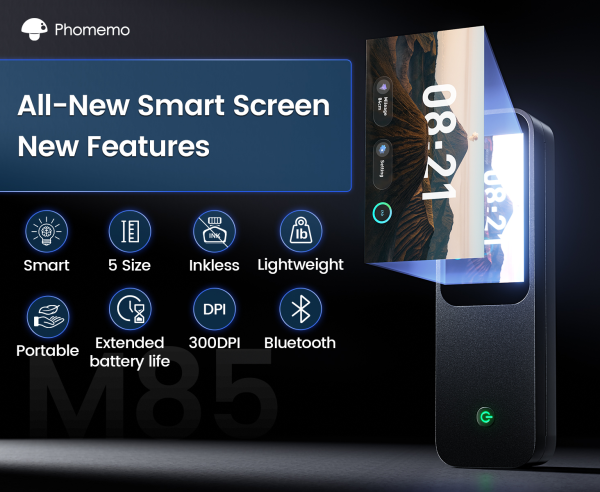
The feature that immediately stands out on the M85 is its large built-in touchscreen.
Rather than relying entirely on a smartphone or computer to control the printer, the M85 puts more information and functionality directly on the device. The touchscreen can display the printer’s real-time battery level, connection status, and paper position, helping users understand the printer’s status before starting a print job.
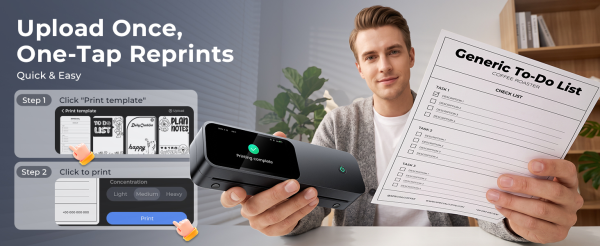
The touchscreen also supports template preview, editing, and direct printing. Frequently used documents, forms, receipts, or other materials can be uploaded as templates and accessed directly from the printer for repeated printing.
Users can also personalize the device with wallpaper, while multi-language support and built-in guides make the printer easier to navigate.
According to Phomemo, these features make the touchscreen more than just a visual feature. It helps the M85 function as a more independent printing device, reducing the need to constantly switch between the printer, phone, and computer.
For anyone who prints the same types of documents repeatedly, that can make everyday printing considerably simpler.
Full-Size Printing in a Portable Design
One of the biggest advantages of the Phomemo M85 is that it doesn’t force users to choose between full-size printing and portability.
The M85 supports US Letter and A4-sized printing, allowing users to print documents, contracts, invoices, forms, reports, and other full-size materials while away from a traditional printer. It also supports smaller paper formats, including 53mm, 80mm, and 110mm, giving users more flexibility for different printing needs.
Despite supporting full-size documents, the M85 weighs only 1.6 pounds and has a compact, folding-umbrella-sized design. It can easily fit into a backpack, work bag, or luggage, making it practical for people who regularly move between locations.
The built-in paper compartment adds another layer of convenience by keeping paper readily available inside the printer, so users don’t necessarily need to carry a separate stack of paper just to print a few documents.
For remote workers, business travelers, and small business owners, that combination can be particularly useful: full-size printing without carrying a full-size printer.
Flexible Connectivity for Mobile and Desktop Work
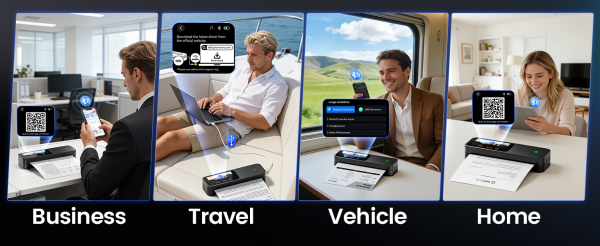
The M85 supports printing from Android and iOS devices via Bluetooth, while USB-C connectivity supports Windows, macOS, ChromeOS, and Linux. This allows documents to be printed from smartphones or computers depending on the workflow.
The M85 is also compatible with commonly used file formats, including Word, Excel, PDF, JPG, and other major formats, making it suitable for a variety of everyday printing tasks.
Whether the document starts on a smartphone or a computer, the M85 is designed to make getting it onto paper relatively straightforward.
Inkless Printing for Work on the Go
The M85 uses inkless thermal printing technology, eliminating the need for traditional ink cartridges. This reduces the need to carry or replace ink when printing away from a traditional office setup.
The M85 is equipped with a 3500mAh battery that supports 200+ pages on a single charge, providing capacity for everyday printing without requiring users to stay close to a power outlet.
These features make the M85 suitable for a range of work and travel situations. Remote workers can use the printer when working from home, coworking spaces, or other locations, while business travelers can print contracts, forms, receipts, and meeting materials without relying on hotel business centers or local printing services. For small business owners, the M85 provides a convenient option for handling paperwork between locations, while its multiple paper sizes also support everyday personal tasks such as lists, schedules, notes, and travel documents.
More Portable Printing Options from Phomemo
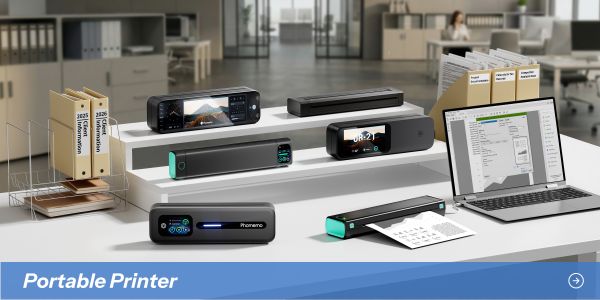
The M85 is part of Phomemo’s broader range of portable printing solutions, with different models designed around different printing needs.
The M832D focuses on everyday document and photo printing, while the M08F offers a lightweight option for users who prioritize simple mobile printing. For users who prioritize faster printing and added flexibility, the G100 Pro offers printing speeds of up to 100mm/s, AirPrint support, and compatibility with multiple paper sizes.
Together, these options give users different ways to balance portability, printing format, speed, and functionality depending on how and where they print.
About Phomemo
Phomemo is a thermal printing brand focused on portable printing solutions for work, business, creativity, and everyday life. Its product lineup includes portable document printers, label printers, photo printers, and other compact printing solutions designed for users who need more flexibility than a traditional desktop printer can offer.
The M85 represents a more full-featured approach to portable printing, bringing together full-size document printing and smart operation in a compact format.
Media Contact
Organization: Phomemo
Contact Person: Annie
Website: https://phomemo.com
Email:
labelmaker@phomemo.com
City: New York
State: New York
Country:United States
Release id:48627
The post Phomemo M85 Redefines Portable Printing for Work and Travel appeared first on King Newswire. This content is provided by a third-party source.. King Newswire makes no warranties or representations in connection with it. King Newswire is a press release distribution agency and does not endorse or verify the claims made in this release. If you have any complaints or copyright concerns related to this article, please contact the company listed in the ‘Media Contact’ section

Disclaimer: The views, suggestions, and opinions expressed here are the sole responsibility of the experts. No The Money Fly journalist was involved in the writing and production of this article.
